



Executive Summary
Choosing between QuickBooks Online and Xero is one of the most critical decisions for Canadian small business owners and accountants. Both are cloud-based, widely adopted, and competent at core accounting tasks. Yet they serve different business types, prioritize different features, and come with dramatically different price points depending on your specific needs.
The fundamental distinction: QuickBooks is built for businesses requiring depth—detailed tax compliance, complex reporting, inventory management, and Canadian-specific features. Xero is built for elegance—clean interface, unlimited users, multi-currency support, and global operations. QuickBooks wins on features and compliance. Xero wins on simplicity and unit economics (cost per user).
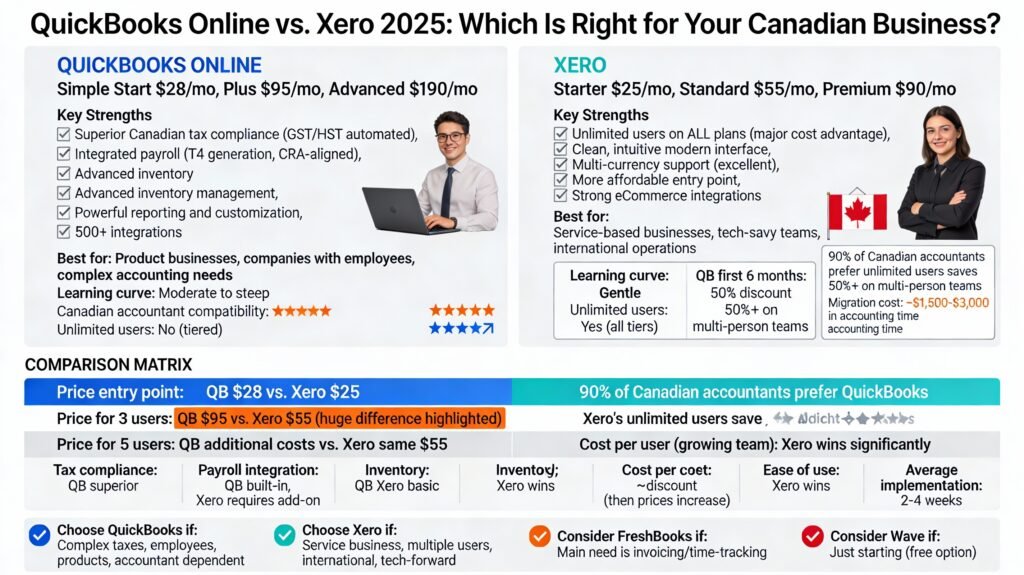
For most Canadian businesses, the choice comes down to three questions: (1) Do you have complex accounting needs or are yours simple? (2) Do you need integrated payroll and inventory management, or just invoicing and expenses? (3) Do you prioritize working seamlessly with your Canadian accountant, or do you prefer a sleek modern interface?
This comprehensive guide compares QuickBooks Online and Xero across 12 critical dimensions, includes decision trees to help you choose, and covers four alternative platforms that may actually be better for your specific business type. By the end, you’ll know not just how these platforms compare, but which one—or alternative—is the right choice for your situation.
Part 1: Head-to-Head Pricing Comparison (2025 Canadian Rates)
QuickBooks Online Pricing Structure
QuickBooks offers four tiers designed to scale with business growth:
Simple Start: $28/month (Promotional: $14/month first 6 months)
- 1 user included
- Unlimited invoices
- Basic income and expense tracking
- Tax deduction tracking
- Receipt capture
- Mileage tracking
- Best for: Solo entrepreneurs, freelancers with simple needs
Plus (Best Value for Growth): $95/month (Promotional: $38/month first 6 months)
- Up to 3 users
- Everything in Simple Start, plus:
- Project profitability tracking
- Inventory tracking
- Multi-currency support
- Batch invoicing
- Up to 3 user accounts
- Best for: Growing service businesses, small product companies
Advanced: $190/month (Promotional: $76/month first 6 months)
- Up to 25 users
- Everything in Plus, plus:
- Automation rules
- Premium support
- Accountant seats (shared access for your bookkeeper/CPA)
- Advanced reporting customization
- Best for: Growing companies with complex needs, multiple locations
Key pricing observations:
- Initial 6-month promotional pricing is substantial (50% discount)
- Pricing increases after promo period—budget accordingly
- Additional users cost extra on higher tiers
- Payroll costs extra ($20-$40/month per employee)
Xero Pricing Structure
Xero offers a simpler three-tier model with a consistent approach to features:
Starter: $25/month
- Unlimited users (major difference from QB)
- Limited to 20 invoices/month
- Limited to 5 bills/month
- Basic invoicing and expense management
- Real-time bank reconciliation
- Best for: Brand-new or very small businesses with minimal transaction volume
Standard (Growing): $55/month
- Unlimited users
- Unlimited invoices and bills
- Everything in Starter, plus:
- Multi-user access
- More advanced reporting
- Bank feeding (automate expense entry)
- Most popular tier for small businesses
Premium (Established): $90/month
- Unlimited users
- Everything in Standard, plus:
- Multi-currency support
- Project tracking
- Advanced analytics
- Best for: Businesses with international operations or complex projects
Add-ons:
- Expense claims: $5/month
- Project tracking (if not in Premium): $10/month
- Payroll add-on (varies)
- These add-ons can increase total monthly cost
Key pricing observations:
- Cheaper entry point ($25 vs. QB’s $28)
- But Starter has invoice/bill caps that most businesses exceed
- Standard ($55) is realistic entry point for most SMBs
- Unlimited users included (huge advantage if multiple people need access)
- No promotional discount period—prices are consistent
Quick Pricing Comparison Table
| Plan | QB | Xero | Users | Best For |
|---|---|---|---|---|
| Entry | $28/mo | $25/mo | QB: 1, Xero: ∞ | Brand new businesses |
| Growth | $95/mo | $55/mo | QB: 3, Xero: ∞ | Small established businesses |
| Advanced | $190+/mo | $90/mo | QB: 25, Xero: ∞ | Growing/complex businesses |
Takeaway: Xero is $30-100/month cheaper depending on tier, with unlimited users. QuickBooks is more expensive but includes more features per tier.
Part 2: Canadian Tax Compliance & CRA Integration
This is where the largest gap emerges between the two platforms.
QuickBooks: The Canadian Compliance Champion
QuickBooks was designed with Canadian tax obligations in mind:
GST/HST Support:
- Automated tracking of GST/HST collected and paid
- Automatic calculation on invoices
- HST reverse calculation (when you receive invoices with HST included)
- GST/HST reporting tools integrated
- Input tax credit tracking (crucial for Canadian businesses)
- Province-specific GST/HST configuration
CRA-Specific Features:
- Automated tax summary reports aligned with CRA requirements
- Mileage tracking (important for CRA deduction substantiation)
- Deduction tracking and categorization
- Receipt capture integrated (CRA loves documentation)
- Financial statements formatted to CRA standards
- Tax checklist to ensure nothing is missed
Payroll Integration:
- Full payroll processing within QB (Canadian tax deductions, CPP, EI)
- T4 slip generation integrated
- ROE (Record of Employment) generation
- Works seamlessly with CRA payroll account
Why this matters: Canadian accountants and bookkeepers prefer QuickBooks because they can access files that already have GST/HST properly coded, payroll correctly tracked, and reports aligned with CRA submission formats. This saves accounting professionals 5-10 hours per client during tax season.
Xero: Adequate but with Gaps
Xero supports Canadian tax requirements but with important limitations:
GST/HST Support:
- Automated GST/HST calculations available
- Tax code support for different rates
- But requires more manual setup to match CRA requirements
- Reporting is less automated than QuickBooks
Payroll:
- Payroll functionality available but less integrated with Canadian tax system
- Businesses often need third-party payroll apps (Wagepoint, Guidepoint, etc.) to get full CRA compliance
- Less seamless than QuickBooks
Gap with Accountants:
- Fewer Canadian accountants specialize in Xero
- Accountants may struggle with non-standard CRA formatting
- Often requires data export and re-entry work
Takeaway: Xero can work for Canadian businesses, but you’ll spend more time on compliance details and possibly pay your accountant more during tax season because they’re less familiar with Xero’s non-standard CRA reporting.
Part 3: Core Features Comparison
Invoicing & Payments
QuickBooks:
- Unlimited invoices on all plans
- Progress invoicing (bill in stages—important for contractors)
- Recurring billing automation
- Professional templates
- Accept online payments (Stripe, Square, bank transfer)
- Multi-language support
Xero:
- Unlimited invoices on Standard/Premium tiers
- Limited to 20/month on Starter tier
- Professional templates
- Strong integration with Stripe and PayPal
- Less flexibility than QB on progress invoicing
- More flexible user permissions (any user can modify without extra cost)
Winner: QuickBooks (progress invoicing valuable for construction/consulting; consistent across all tiers)
Expense Tracking & Receipt Capture
QuickBooks:
- Built-in receipt capture (snap photos on mobile)
- Automatic categorization
- Mileage tracking (automatic from mobile device)
- Expense management integrated throughout
- Strong for GST/HST input credit tracking
Xero:
- Integration with Hubdoc (automatic bill/receipt pulling)
- Receipt storage
- Expense tracking
- Feels separate from core accounting system
- Good but less integrated than QB
Winner: QuickBooks (more integrated, mobile-first design)
Reporting & Financial Statements
QuickBooks:
- Extensive customizable reporting
- P&L, balance sheet, cash flow, aging reports
- Tax summary reports aligned with CRA
- Profitability by customer, project, location
- Custom report builder
- Data visualization dashboards
Xero:
- Solid standard reports
- P&L, balance sheet, cash flow, aging
- Less customization than QB
- Dashboard visualizations
- May need third-party apps (Spotlight, LiveFlow) for advanced analytics
Winner: QuickBooks (more depth and customization)
Inventory Management
QuickBooks:
- Item assemblies (useful for manufacturers)
- Inventory valuation methods (FIFO, average, standard cost)
- Low-stock alerts
- Purchase orders integrated
- Inventory by location
- Strong for e-commerce and product businesses
Xero:
- Basic inventory tracking
- Tracks quantity and cost
- Suitable for simple product tracking
- Limited valuation options
- Not suitable for complex inventory operations
Winner: QuickBooks (significantly stronger inventory capabilities)
Multi-User Access & Collaboration
QuickBooks:
- User limits by tier (1, 3, 25)
- Each additional user costs extra
- Accountant seats available for bookkeepers/CPAs (separate pricing)
- Role-based permissions
- Limited to company size/tier
Xero:
- Unlimited users on all tiers
- Powerful permission controls
- Invite accountants without extra cost
- Real-time collaboration
- Significant cost advantage for businesses with 3+ users
Winner: Xero (unlimited users are huge advantage)
Integrations & App Ecosystem
QuickBooks:
- 500+ integrations available
- Strong Canadian SME app ecosystem
- Shopify, Amazon, PayPal, Stripe native integration
- Time tracking apps (Clockify, Toggl, QuickBooks Time)
- CRM integration (HubSpot, Pipedrive)
Xero:
- Large app marketplace (especially eCommerce and time-tracking)
- Strong Shopify, WooCommerce, Amazon integration
- Better for eCommerce businesses
- Still substantial but fewer Canadian SME specialized apps
Winner: QuickBooks (broader Canadian SMB ecosystem)
Part 4: Ease of Use & Learning Curve
QuickBooks: Powerful but Dense
Learning curve: Moderate to steep
- Interface can feel “old school” to new users
- Many features means many menu options
- Takes 2-4 weeks to become comfortable
- But structure makes sense once learned
- Strong onboarding tutorials available
- Mobile app is intuitive
Best for: Business owners willing to invest time in mastering a powerful tool
Xero: Modern & Intuitive
Learning curve: Gentle
- Clean, minimal interface appeals immediately
- Less overwhelming for new users
- Takes 1-2 weeks to become comfortable
- Dashboard provides good overview
- Mobile-first design (very modern feel)
- Some Canadian users report frustration when trying to adapt it to CRA-specific needs
Best for: Tech-savvy business owners who prefer simplicity over power
Takeaway: If you want a tool you can use immediately (and your accountant will help with compliance), Xero wins. If you want a comprehensive system where you can eventually do all accounting yourself, QuickBooks edges ahead.
Part 5: Decision Trees—Which Should You Choose?
Decision Tree 1: By Business Type
I’m a Freelancer or Consultant
→ Consider: Xero (simpler), FreshBooks (better invoicing/time tracking)
→ Not ideal: QuickBooks (overkill)
I run a Service Business (e.g., plumbing, accounting, consulting)
→ Consider: QuickBooks Plus (strong invoicing, project tracking)
→ Alternative: FreshBooks (excellent for service billings)
I sell Products (e-commerce, retail, manufacturing)
→ Consider: QuickBooks Plus/Advanced (superior inventory)
→ Alternative: Sage 50 (if you have complex inventory + payroll)
I have Employees & Run Payroll
→ Consider: QuickBooks Essentials+ (integrated payroll)
→ Alternative: Sage 50 (desktop option with payroll)
I have International Operations or Multiple Currencies
→ Consider: Xero Premium (strong multi-currency)
→ Alternative: Business Central (enterprise ERP)
I work with my Canadian Accountant closely
→ Consider: QuickBooks (accountants prefer it)
→ Alternative: Sage 50 (accountants also understand)
Decision Tree 2: By Budget Priority
Under $30/month total:
→ Xero Starter ($25) or Wave (free)
→ Limited to very small operations
→ Xero Starter invoices capped at 20/month
$30-$75/month:
→ Xero Standard ($55) – unlimited users
→ QuickBooks Simple Start ($28) to Plus ($95)
→ This is the “sweet spot” for small businesses
$75-$150/month:
→ QuickBooks Plus ($95) or Advanced ($190)
→ Xero Premium ($90)
→ Add payroll/integrations as needed
$150+/month:
→ QuickBooks Advanced ($190) or Business Central
→ Full-featured for growing companies
Part 6: Alternative Platforms That May Be Better for You
While QuickBooks and Xero dominate, three alternatives excel in specific scenarios:
FreshBooks: Best for Service Businesses
Ideal for: Consultants, freelancers, agencies, service companies
Why FreshBooks over QB/Xero:
- Strong invoicing (main value prop)
- Time tracking built-in on all plans
- Easier than QB, more focused than Xero
- Better project profitability tracking
Pricing: Lite $19/month, Plus $38/month, Premium $65/month (cheaper than QB Plus)
Limitations:
- Limited clients on lower tiers
- No inventory management
- Less suitable for product businesses
Wave: Best for Starting (Free)
Ideal for: Solopreneurs, brand-new businesses, extremely cost-conscious
Why Wave:
- Completely free (no credit card required)
- Simple interface
- Excellent invoicing
- Easiest to learn
Pricing: Free + payment processing fees (2.9% + $0.30 per transaction)
Limitations:
- 1% fee on invoicing if you accept online payments
- Limited reporting
- No inventory management
- Outgrow within 1-2 years typically
- Processing fees add up on high-volume invoicing
Sage 50cloud: Best for Desktop + Complexity
Ideal for: Businesses wanting desktop power plus cloud flexibility, complex inventory/payroll
Why Sage 50:
- Combines desktop reliability with cloud access
- More powerful than QB/Xero for complex businesses
- Better if you have employees + inventory
- Canadian-focused (40+ years in Canada)
Pricing: Three tiers (Pro, Plus, Premium)—comparable to QB
Limitations:
- Desktop-focused (not purely cloud)
- Steeper learning curve
- Less modern interface than Xero
Part 7: Real-World Scenarios & Recommendations
Scenario 1: Freelance Graphic Designer, Solo Operation
Recommended: FreshBooks Lite ($19/month)
Why:
- Invoicing is primary need
- Time tracking built-in (bill hourly)
- Simple interface
- Minimal setup required
Alternative: Xero Starter ($25) if you prefer modern interface + want to grow to team later
Scenario 2: E-commerce Business with 20 SKUs, 2 employees
Recommended: QuickBooks Plus ($95/month)
Why:
- Inventory tracking essential
- Integrated payroll important
- Growth potential up to Advanced tier
- Shopify/Amazon integration strong
Not recommended: Xero (inventory too basic)
Scenario 3: Management Consulting Firm, 4 Employees, Works with Accountant Quarterly
Recommended: QuickBooks Essentials ($75/month) or Plus ($95/month)
Why:
- Project-based billing important
- Accountant expects QB files
- Multiple users (built-in)
- Professional reporting for client invoicing
Alternative: FreshBooks Premium ($65) if less accounting complexity
Scenario 4: SaaS Company, International Operations, Growth Stage
Recommended: Business Central or Xero Premium ($90/month)
Why:
- Multi-currency essential (Xero strong)
- Growth scaling (Business Central scales)
- Real-time dashboards matter
- Unlimited users reduce cost per person
Not recommended: Wave (outgrow immediately); QuickBooks (not built for scale)
Part 8: Moving Costs & Migration Considerations
Switching from QuickBooks to Xero (or vice versa)
Direct costs:
- QuickBooks export: Free
- Xero import: Usually free using third-party tools
- Data cleanup: 10-20 hours of accounting time (~$1,500-$3,000)
Why migration costs exist:
- Chart of accounts may differ
- Tax codes need remapping
- Historical transaction coding must align
- Inventory values need reconciliation
Recommendation: Migrate at start of new fiscal year (less complicated than mid-year)
Avoiding Expensive Mistakes
- Don’t export multiple times to “test”—creates inconsistent historical data
- Don’t migrate mid-year—causes tax year complications
- Don’t assume automatic import—manual cleanup always required
- Do engage your accountant in migration planning—they’ll know what matters for tax reporting
Part 9: Final Decision Matrix
Use this matrix to score your business:
| Factor | Weight | QB Score | Xero Score | Your Priority |
|---|---|---|---|---|
| Tax Compliance | 5 | 5/5 | 3/5 | _____ |
| Payroll Integration | 4 | 5/5 | 2/5 | _____ |
| Inventory Management | 4 | 5/5 | 2/5 | _____ |
| Ease of Use | 3 | 3/5 | 5/5 | _____ |
| Unlimited Users | 3 | 1/5 | 5/5 | _____ |
| Pricing | 3 | 3/5 | 4/5 | _____ |
| Accountant Compatibility | 2 | 5/5 | 3/5 | _____ |
| Multi-currency | 2 | 3/5 | 5/5 | _____ |
Scoring: If your weighted total for QB > Xero, choose QB. If Xero > QB, choose Xero. If close, consider alternatives
Part 10: 30-Day Implementation Plan
Week 1: Research & Demo
- Sign up for both QB and Xero free trials
- Import sample data into each
- Send trial credentials to your accountant
- Ask accountant: “Which platform are you most comfortable with?”
Week 2: Feature Testing
- Create 3-4 sample invoices in each
- Test expense tracking in both
- If relevant: Test inventory and payroll features
- Check integration with your current tools (payment processor, CRM)
Week 3: Price & Support Assessment
- Calculate true 12-month cost (account for promo pricing ending)
- Review support options (QB is stronger; Xero has good community)
- Check migration costs if switching from existing software
Week 4: Decide & Implement
- Make final decision
- Purchase annual subscription (if available discount)
- Plan data migration if switching platforms
- Schedule kickoff call with your accountant
Conclusion: No One-Size-Fits-All Answer
There is no universally “best” accounting software. QuickBooks is best for businesses needing Canadian tax compliance and powerful features. Xero is best for simplicity, multi-user collaboration, and international operations. FreshBooks is best for service businesses with invoicing as the core need. Wave is best for bootstrapping a new venture.
Your decision should be based on:
- Your business type (service vs. product; simple vs. complex)
- Your team size (solo vs. multiple users)
- Your growth trajectory (starting out vs. scaling)
- Your accountant’s preference (especially important in Canada)
- Your comfort with technology (learning curve matters)
Most Canadian small businesses ultimately choose QuickBooks because the Canadian tax compliance and accountant compatibility overcome the higher price. But if you’re service-based, tech-savvy, and have multiple users, Xero’s unlimited users and $30-40/month savings may win.
Try both. Free trials exist for a reason. Run the same transactions through each platform for one week. See which feels natural. The best accounting software is the one you’ll actually use consistently—and that’s different for every business.
Article created for BOMCAS Canada, Edmonton & Sherwood Park. For questions about accounting software setup, implementation, bookkeeping services, or consultation on which platform is right for your business, contact info@bomcas.ca or 780-667-5250.










 View Our Location





 181 Meadowview Bay, Sherwood Park, AB T8H 1P7, Canada (Online Clients Only)